Know where your
money goes.

I built Vyu for myself and my friends. It logs your spending and keeps it on your phone. No account, no bank login, no ads. There are a lot of expense apps out there. This is one more.

  • No account to create
  • Your expenses stay on your iPhone
  • No ads and no tracking
  • Export your data whenever you like
Try the beta on TestFlight Free while in beta. You'll need Apple's TestFlight app, and the App Store release comes next.
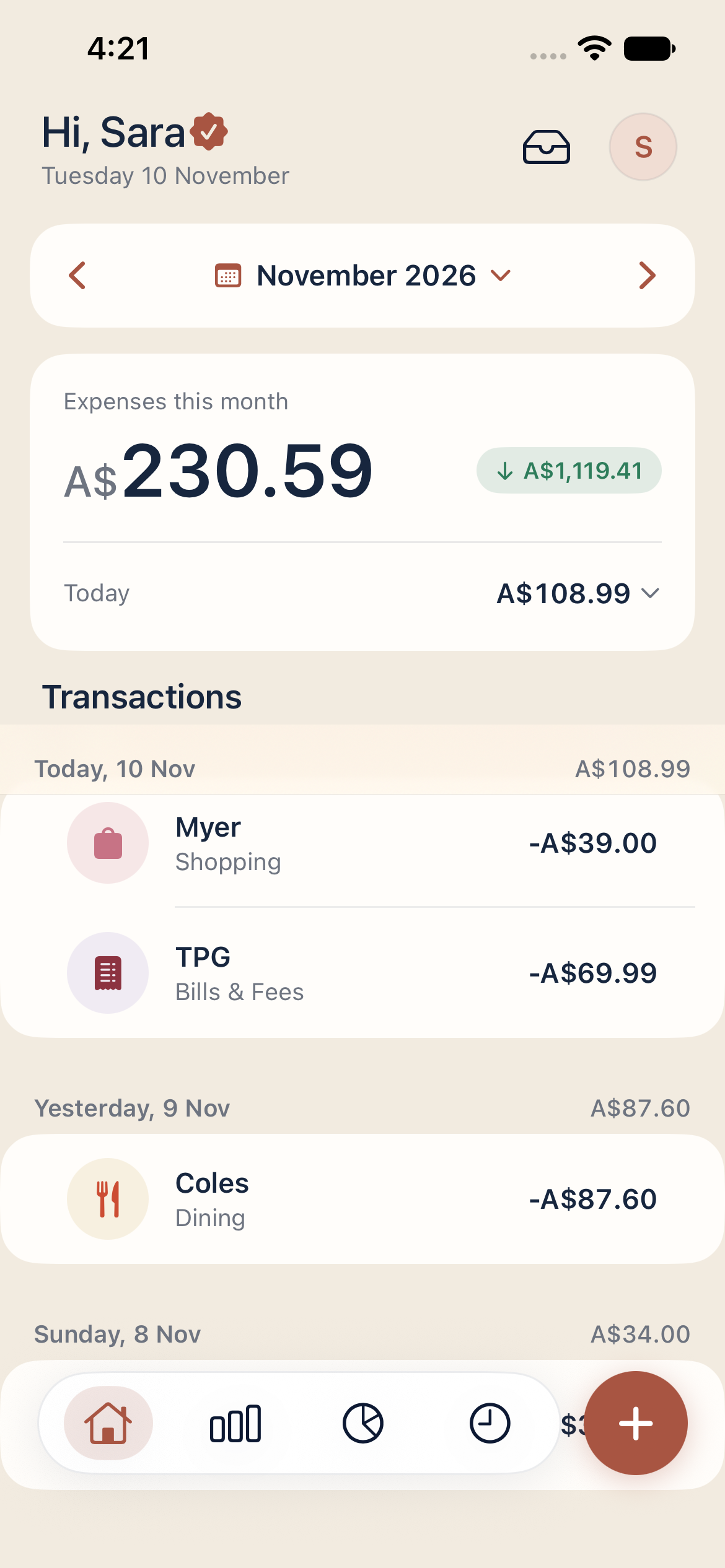
The Vyu dashboard on an iPhone, showing expenses of A$230.59 this month and A$108.99 today, above recent expenses from Myer, TPG and Coles.
0
ways to capture an expense
0
days of Pro free
0%
of your expenses stay on your phone
0
ads, ever

What Vyu is

Expense apps feel like homework.

The problem

Most expense apps want fifteen dollars a month, then bury the answer under ads, charts and jargon you never asked for. You open them twice and never again.

Who it's for

I made Vyu for people who just want a clear view of their money. It works in the background, stays out of your way, and only shows what actually matters.

How it works

Three steps, and two of them aren't yours.

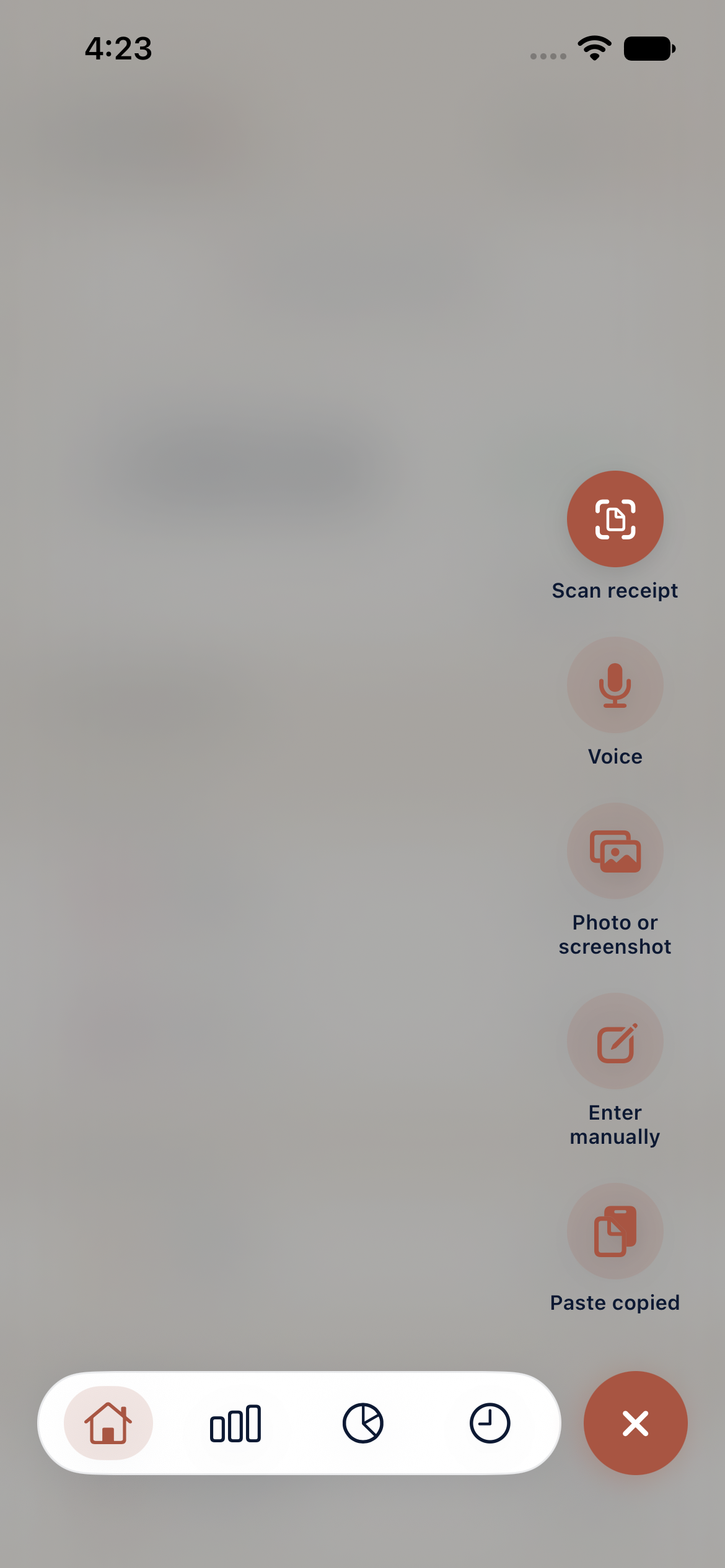
The Add expense sheet in Vyu, offering Scan receipt, Voice, Photo or screenshot, Enter manually and Paste copied.

01

Pay as usual

Tap with Apple Pay, scan the receipt, say it out loud, or paste what you copied. Whatever is quickest.

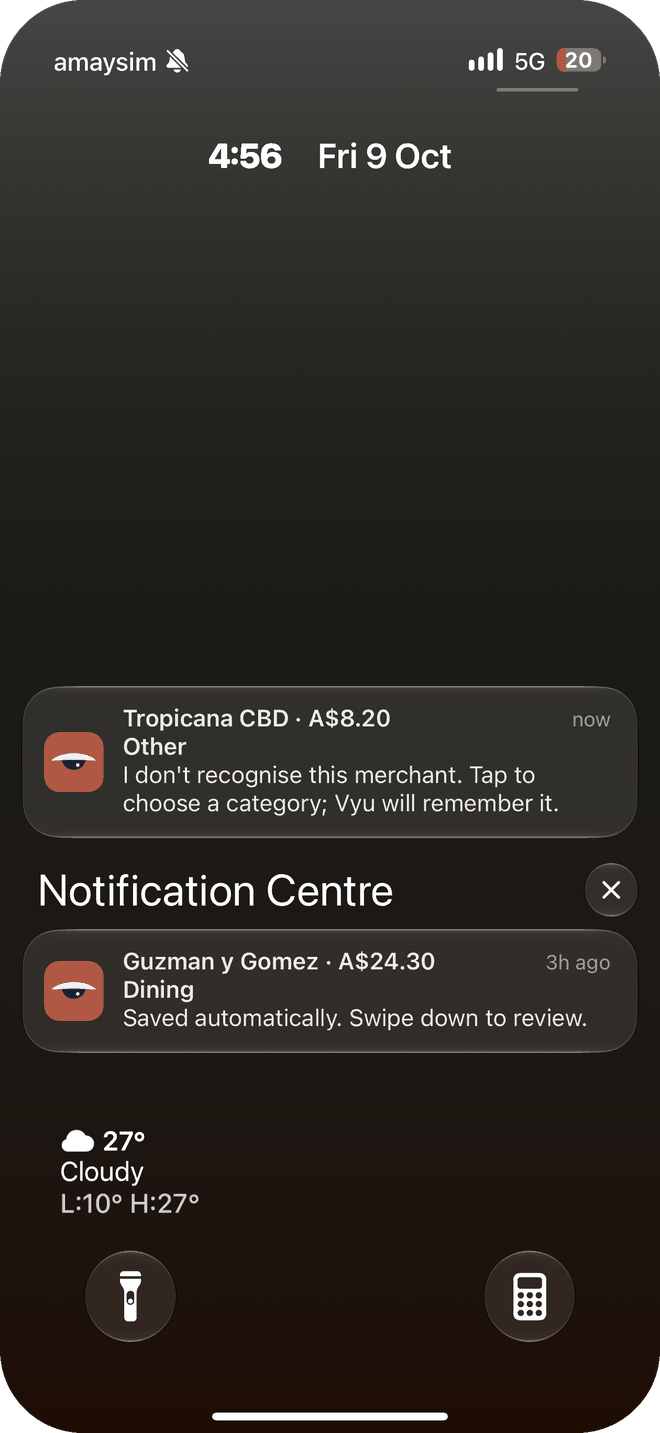
A lock screen notification from Vyu reading 7-Eleven, A$3.70, Groceries, saved automatically.

02

Vyu catches it

Merchant, amount and category land on your lock screen, already saved. Swipe down only if something needs changing.

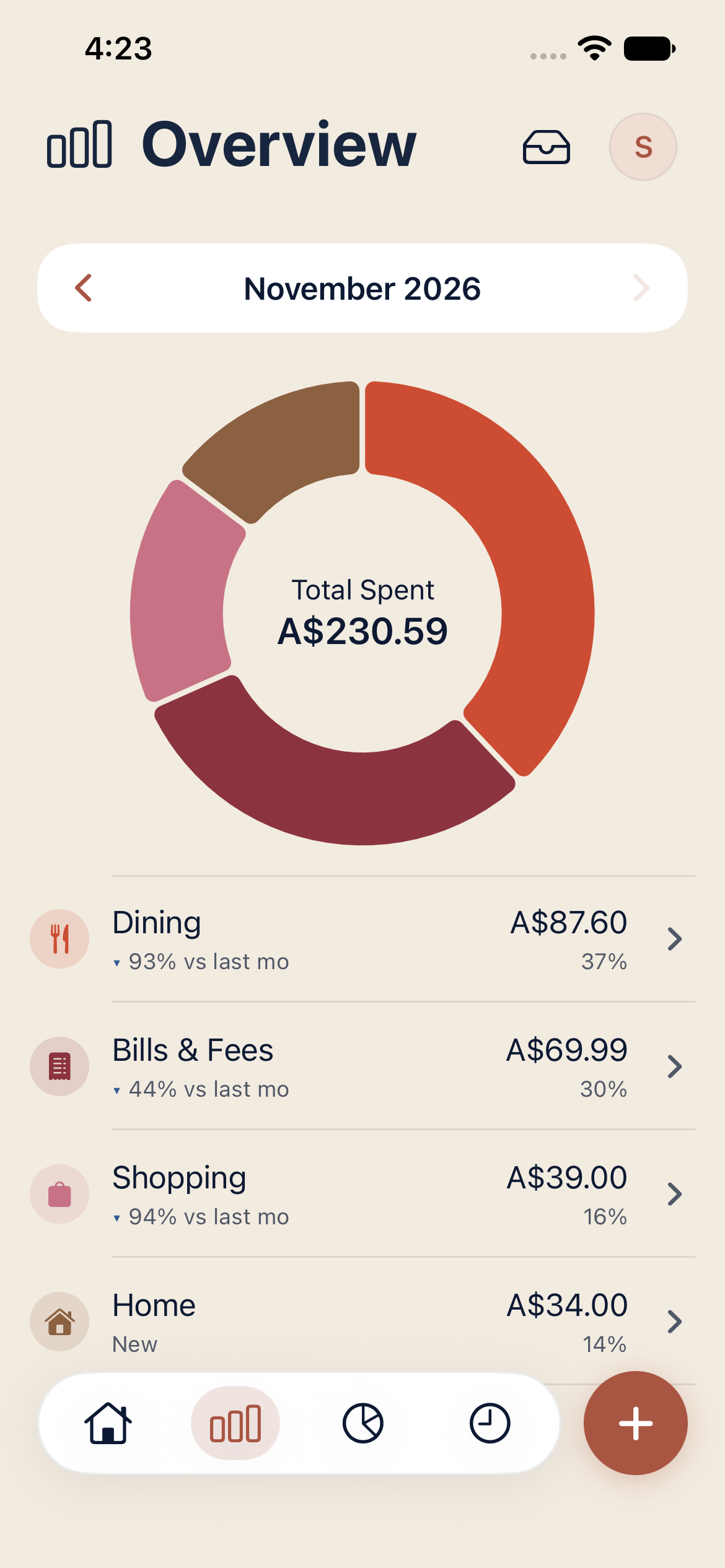
The Overview screen in Vyu, with a donut chart showing total spent A$230.59 split across Dining, Bills & Fees, Shopping and Home.

03

See what matters

One screen tells you where the month went. No spreadsheets, no math.

Six ways an expense gets in

Apple Pay

Tap to pay, and Vyu logs the purchase. Needs a one-time setup.

Email receipts

Receipts land in your inbox and Vyu reads the amount out of them. Set it up once.

Receipt scan

Point the camera at a paper receipt and Vyu reads it.

Photo or screenshot

Pick a picture you already took from your photos.

PDF or a pasted link

Invoices that arrive as a file, or an order link you paste in.

Your voice

"Twelve dollars, coffee." From the widget, without opening the app.

Vyu Mail Sync

The receipts are already in your inbox.

Every time you buy something online, a receipt lands in your email. Vyu reads the amount and the merchant out of it and saves the expense for you. You set it up once, and it works in the background.

Online orders

The confirmation email becomes the expense. No photo, no typing, no remembering.

Subscriptions and invoices

Recurring bills, software, services. They show up on their own, month after month.

Your inbox stays yours

Vyu never reads your email. You choose which messages are receipts, and that is all Vyu ever sees.

Mail Sync is part of Pro. Set it up once from the app, in English or Spanish.

Features

Three things I actually use.

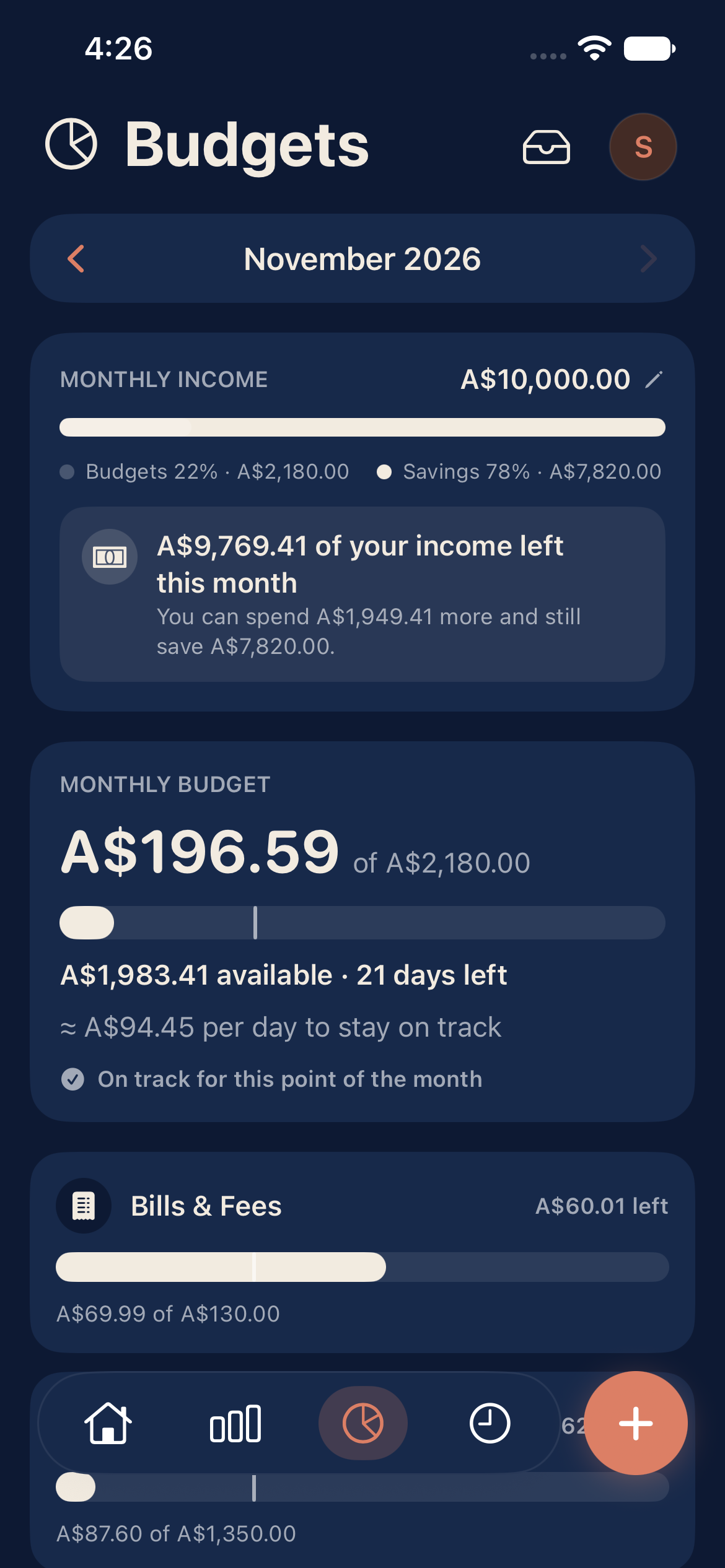
The Budgets screen in Vyu in dark mode, showing monthly income of A$10,000.00, A$9,769.41 left this month, and a per-day pace of about A$94.45 to stay on track.

Know what's left, not just what's gone

Split your income between budgets and savings, then let Vyu do the arithmetic: what's left this month, how much a day keeps you on track, and a nudge on your lock screen well before you run out.

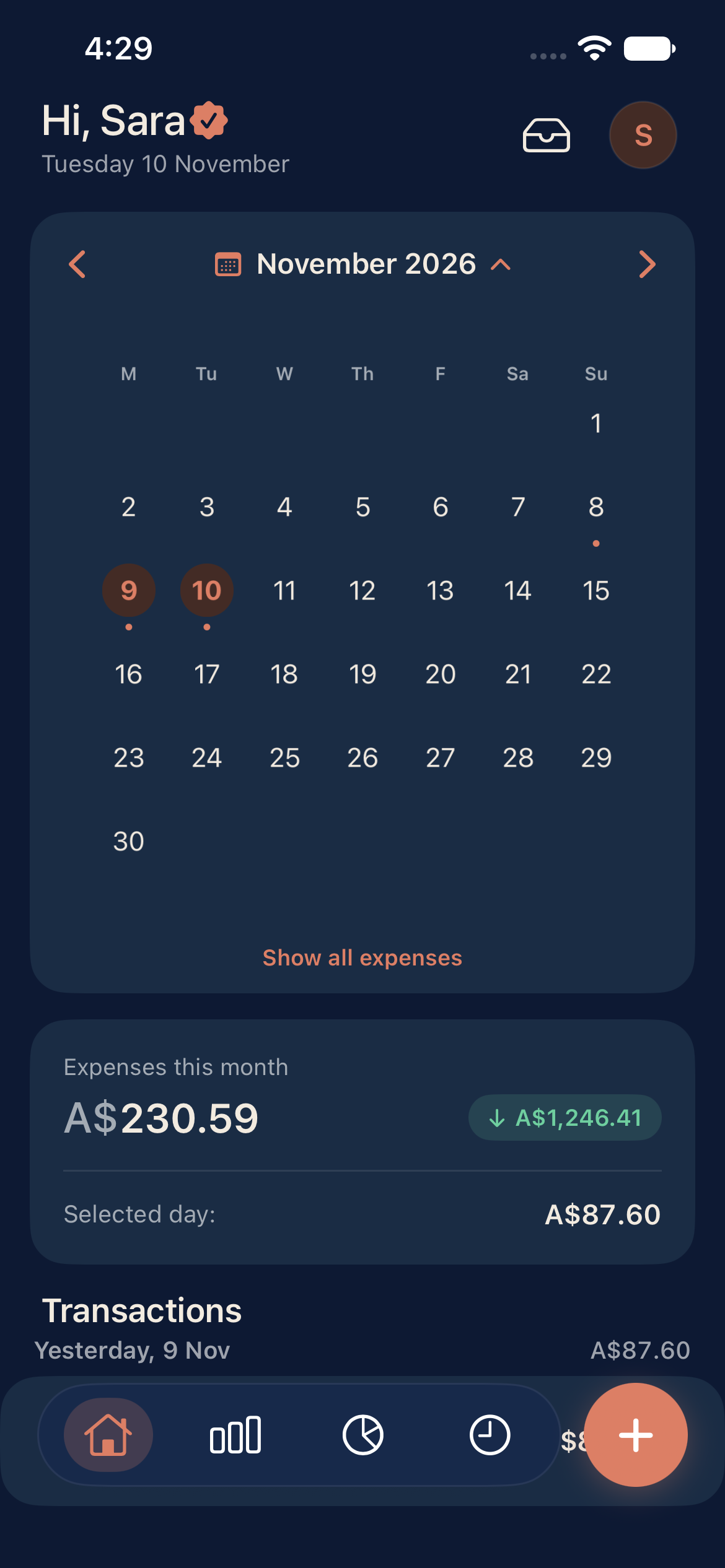
Your month at a glance

A calendar of your spending day by day, and a donut that shows where it goes. Search your history by month or by financial year.

Vyu in dark mode, showing the November 2026 calendar with spending marked on days 9 and 10.

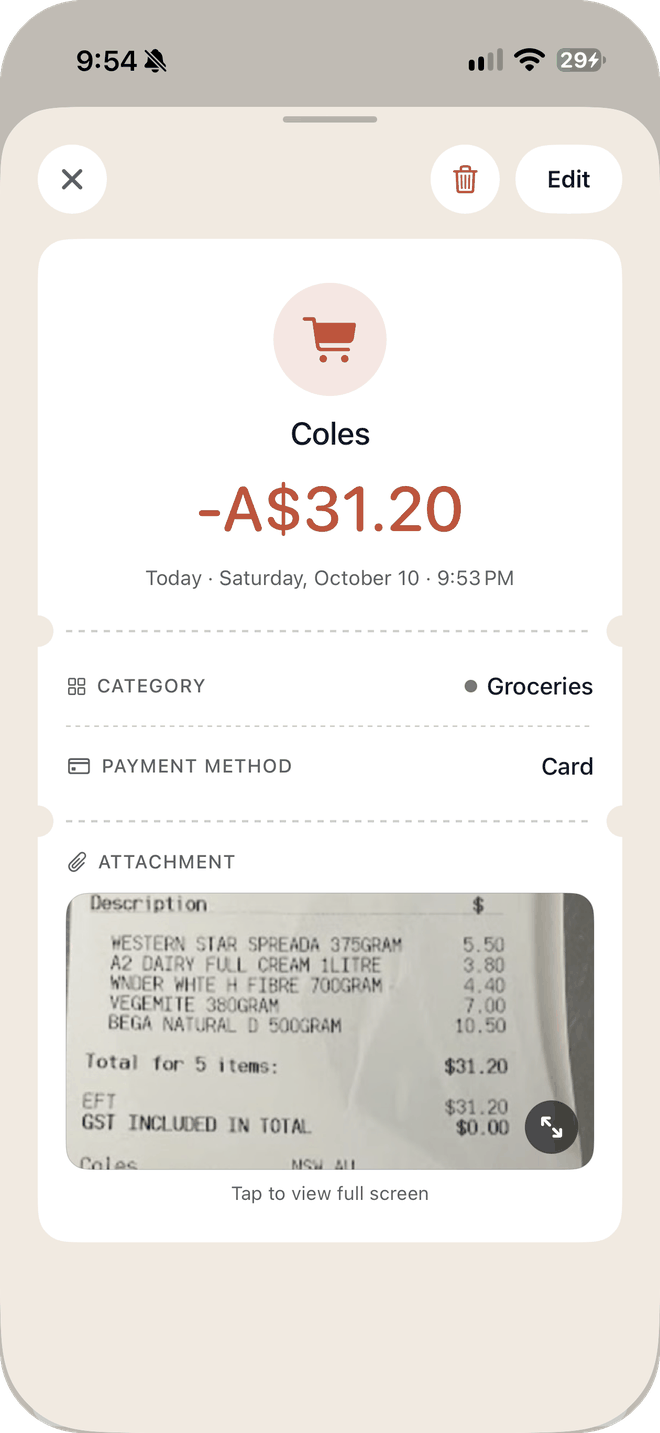
Every expense, receipt included

Each expense opens as a paper ticket: merchant, amount, category, payment method, and the receipt itself still attached. Tap it to read the whole thing at full size.

An expense detail in Vyu laid out like a paper ticket: Coles, -A$31.20, Groceries, with the scanned grocery receipt attached.

Always within reach

Wherever you already are.

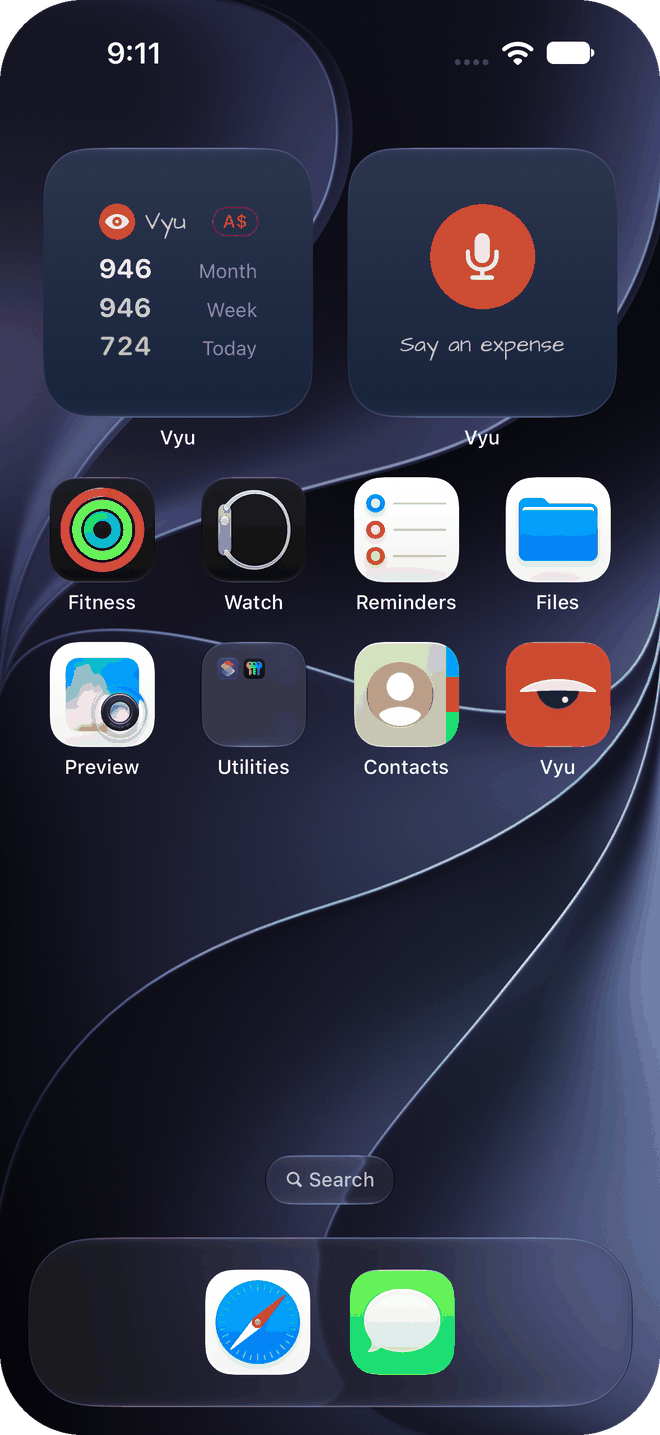
An iPhone home screen with two Vyu widgets: a spending summary for the month, week and today, and a microphone widget labelled Say an expense.

On your home screen

See today, this week and this month at a glance, and tap the microphone to say an expense out loud, without opening the app.

Pay with your Apple Watch

Payments you make with Apple Watch are logged the same way as on your iPhone, and you can accept or undo them right from your wrist.

Vyu does not have its own Apple Watch app.

6:45 now 7-Eleven · A$10.35 Groceries Saved automatically. Swipe down to review. Accept Undo

Privacy

Your money is nobody else's business.

Where your expenses live

Vyu has no servers of its own where your expenses are kept. Everything lives on your iPhone and, if you want, in your own iCloud backup. Purchases are handled by Apple.

What Vyu never asks for

No account, no bank logins, no read access to your accounts. Vyu only ever sees what you hand it: a tap, a receipt, an email, a sentence.

Pricing

Free to use. Pro when you outgrow it.

Everything is free during the beta. These prices apply when Vyu reaches the App Store.

Free

A$0

The whole app, with monthly caps on the automatic bits. No ads either way.

Pro

A$29.99 a year

or A$4.99 a month · A$59.99 once, for good

Every cap removed. 30 days of Pro free when you first open the app, then choose Pro, or stay on Free.

What you get
Free
Pro
PDF invoices
3 a month
Unlimited
Apple Pay logging
15 a month
Unlimited
Receipt photos
5 a month
Unlimited
Pasted links
3 a month
Unlimited
Voice entries
5 a month
Unlimited
Mail Sync
Not included
Included
Budgets
2
Unlimited
History you can browse
3 months
All of it
Manual entry
✓
✓
CSV export
✓
✓
Backup
✓
✓
Ads
None
None

CSV export and backup are free on both plans.

What's next

Two things I'm building.

Planned for v2

Vyu Duo

Shared spending for two people — a household, a couple, a flat — without merging the rest of your money.

Planned for v2

Vyu Travel

A trip as its own pot of spending, so a holiday doesn't quietly wreck the month it lands in.

Neither is in the app yet and neither has a date. When they arrive, they are part of Pro at no extra cost — if you are on Pro, you get them.

Questions

Before you ask.

Does it connect to my bank?

No. No bank logins, no read access to your accounts. Vyu only sees what you show it: an Apple Pay tap, a receipt, an email, a sentence you say out loud.

What happens when I change phone?

Restore your new iPhone from an iCloud or computer backup and your expenses come across with it. You can also export everything to CSV first and keep your own copy.

Are there ads?

None, on either plan. Vyu is paid for by the people who choose Pro, not by advertisers.

Does it need an internet connection?

Your expenses are on your phone, so browsing, adding and editing them works without a connection. Some of the automatic capture depends on things that arrive online, such as email receipts and pasted links.

When are Duo and Travel coming?

They're planned for v2 and I'm not putting a date on them. They'll be included in Pro at no extra cost.

Is there an Android version?

Not for now. Vyu is built around things only an iPhone does — Apple Pay, Shortcuts, widgets — so an Android version would be a different app, not a port.

If this sounds like you, try it.

No account, no ads, no bank logins. Your expenses stay on your iPhone. I built it in Melbourne.

Try the beta on TestFlight Free while in beta.